Granite countertop visualizer
Your customer photographs their own kitchen, taps a granite slab from your inventory, and sees the finished countertop in seconds — in their room, their light, their cabinets. No app, no account, nothing to install.
The sample is the problem
A granite sample is about ten centimetres across. A slab is three metres long. Granite is an igneous rock, so its crystals, colour banding and movement develop at the scale of the whole block — which means the sample shows a customer the grain but never the pattern. Two pieces cut from the same block can read as different stones once they are up on the cabinets.
That gap is where countertop sales stall. The customer likes the sample, cannot picture the room, and asks for time to think. Some come back. Many do not, and the ones who do often arrive at templating surprised by how much movement the slab actually has.
What the visualizer does
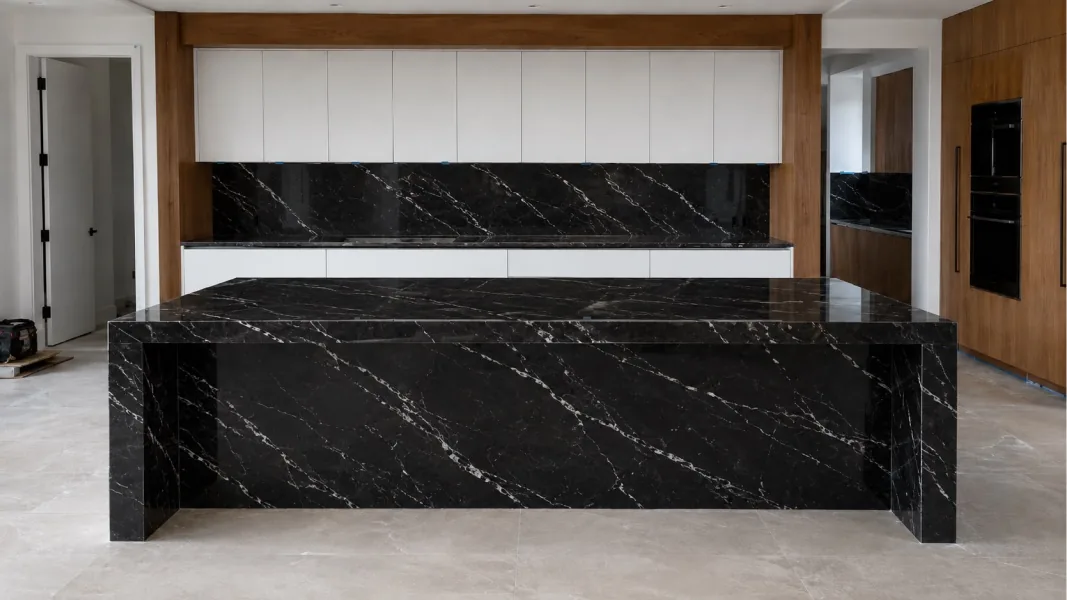
SlabSnap closes the gap before anything is cut. You send a private link; your customer opens it on their phone, photographs the kitchen they actually live in, and applies a granite from your catalog. Seconds later that exact slab is rendered into the photo — photorealistic, true to scale, with only the countertop replaced. The cabinets, floor, backsplash and lighting in their picture stay exactly as they are.
How it works
- Send the link. One click in your dashboard creates a private link. Send it by text, WhatsApp or email.
- They snap and choose. Your customer photographs their kitchen, island or bathroom, then taps the granite they want to try.
- They see the stone. The slab appears in their real space in seconds. They can try another, and another, without a second visit to the yard.
- The lead comes back to you. Every slab they pick lands in your dashboard, so you follow up knowing exactly which stone they chose.
It shows your granite, not a stock photo
You upload photos and details of the granite you actually have in the yard, once. From then on your customers browse exactly that inventory. Nothing generic is substituted, so nobody falls in love with a slab you cannot deliver — which is the other half of why countertop deals fall apart.
The same works for marble, quartzite, quartz, porcelain, onyx and soapstone. Granite is simply where most fabricators start, because it is where the sample-to-slab gap is widest.
Where you can apply it
- Kitchen countertops and backsplashes
- Waterfall islands
- Bathroom vanities and shower surrounds
- Fireplace surrounds
- Outdoor kitchens
- Feature walls
The surface is detected automatically, so your customer does not trace or mask anything. They take the picture and tap a slab.
Your customer's photo is never stored
This is a property of how the system is built, not a setting. The photo is processed in memory to produce the preview and then discarded. Only the lead and your own slab catalog are saved. Nothing of the customer's home is kept on our servers, which is worth saying out loud when you send the link.
Questions fabricators ask
Does the visualizer use my own granite slabs?
Yes. You upload photos and details of the granite you actually have in the yard, so the customer only ever sees stock you can deliver.
Why does granite look so different in a sample versus a full slab?
Granite is an igneous rock, and its crystals, movement and colour banding run at the scale of the whole block. A ten-centimetre sample shows the grain but not the pattern, which is why customers are so often surprised at templating.
Does my customer need an app to see it?
No. They open the private link you send in their phone's normal browser. There is no app, no account and no download.
What happens to the photo of the customer's kitchen?
It is processed in memory to build the preview and is never stored on our servers. Only the lead and your slab catalog are saved.
What does it cost to try?
A new account starts with 3 free credits, and one visualization uses one credit. You buy further credit packs inside the platform when you need them.
Start with your own inventory
See the whole flow in the step-by-step tutorial, or go straight to creating an account and load your first slabs.